
A media library, a private backup system, and a container host rarely fit neatly into one small box. I focus on six x86-based home server options that approach the problem from different angles, from compact all-in-one systems to six-bay storage enclosures.
The Choices Worth Comparing

ZimaBoard 2 1664 N150 16GB
ZimaBoard 2 832 N150 8GB DDR5, Dual SATA 3.0, Dual 2.5GbE, PCIe 3.0 x4

6-Bay Desktop NAS i3-1215U 256GB NVMe

6-Bay Desktop NAS i5-1235U 16GB 256GB NVMe
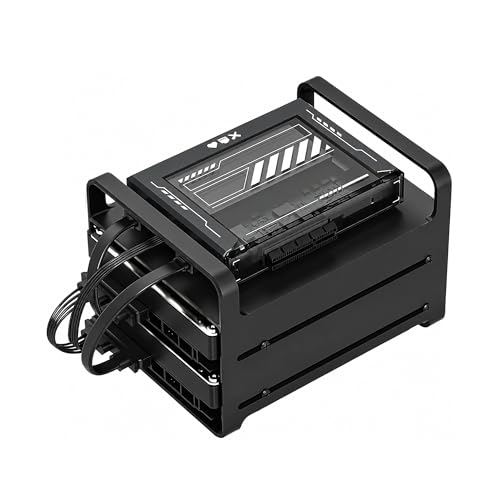
ZimaBlade 7700 2-Bay NAS Kit 16GB

ZimaBoard 2 N150 Home Server
The Strengths Of Each Pick
The ZimaBoard 2 1664 pairs an Intel N150 processor with 16GB of LPDDR5 memory, giving compact home server setups more working memory than the 8GB ZimaBoard 2 832. I favor it for containerized services, private file access, and lightweight home lab tasks where memory pressure can determine whether several services coexist comfortably.
Its full-length PCIe 3.0 x4 slot is an expansion bus that accepts compatible add-in cards, including NVMe storage or a faster network adapter. Compared with the six-bay ZIMA CUBE systems, it occupies far less room, although that compactness means adding storage requires deliberate card and enclosure planning.
Real Benefits
- The 16GB memory configuration gives Docker containers and several concurrent services more room to operate together.
- The quad-core N150 reaches 3.6GHz, providing a sensible x86 foundation for everyday server software.
- A 64GB eMMC boot drive keeps the operating system separate from added data drives.
- Its low-power design suits continuous placement near a router, switch, or home office equipment.
Trade Offs
- The compact board does not provide the same native drive-bay capacity as a six-bay desktop enclosure.
- Storage expansion depends on compatible PCIe cards and suitable housing, so the complete system plan matters.
Quick Facts
Who It Suits Best
I recommend this model to compact homelab operators who need more memory headroom than a basic 8GB board.
Where Another Pick Suits Better
The ZimaBoard 2 832 fits lower-cost dual-drive NAS setups that prioritize native SATA and 2.5GbE connections.
Storage is the deciding factor in the ZimaBoard 2 832. Two SATA 3.0 ports accept hard drives or SATA solid-state drives without a USB storage adapter, while the Intel N150 handles the basic work of a network-attached storage system, media server, or backup target.
Dual 2.5GbE Ethernet ports offer a practical upgrade over ordinary gigabit networking, meaning a suitably equipped client can transfer large files more quickly. The 8GB memory configuration and 32GB eMMC are more restrained than the ZimaBoard 2 1664, so heavier container workloads may feel constrained.
A Strong Showing
- Dual SATA ports make a two-disk mirrored or expanded storage arrangement straightforward.
- Dual 2.5GbE ports suit multi-gigabit home networks and large file transfers.
- The PCIe 3.0 x4 slot can add NVMe storage or another network interface.
- ZimaOS provides file management, backup, private media sharing, and more than 500 plugins.
Points To Note
- The 8GB memory limit makes the 16GB ZimaBoard 2 1664 a better fit for memory-heavy services.
- Native storage capacity remains below that of the six-bay ZIMA CUBE options.
Key Attributes
Built With In Mind
This board fits households that want direct disk connections and multi-gigabit networking in a compact package.
Consider Something Else When
The 6-Bay Desktop NAS i3-1215U 256GB NVMe serves users who need more internal drive bays and higher storage capacity.
The 6-Bay Desktop NAS i3-1215U 256GB NVMe is built around a simple division of labor: six hard-drive bays handle archive storage, while NVMe solid-state storage provides a faster working area. I see this arrangement as useful for large photo collections, media libraries, and files that need quick access alongside long-term capacity.
The Intel Core i3-1215U gives the enclosure more general-purpose processing power than the compact ZimaBoard models. Its desktop format also makes the storage layout easier to understand, although it takes more shelf space and requires separate consideration of drives, operating system setup, and backup destinations.
Everyday Perks
- Six hard-drive bays support a substantial archive without relying on external storage.
- The included 256GB NVMe drive can hold the operating system and frequently accessed applications.
- Total storage can reach 212TB with supported 30TB hard drives.
- Dual PCIe 4.0 slots provide room for additional compatible expansion cards.
Practical Considerations
- The full six-bay configuration requires six compatible drives and enough physical space for the desktop enclosure.
- Maximum capacity depends on the exact supported drive configuration rather than the enclosure alone.
- Compared with the ZimaBoard 2 832, the desktop chassis consumes more room and offers less operational simplicity.
Made For
I recommend this model for archivists, media collectors, and families combining large-capacity drives with fast NVMe storage.
A Better Fit Elsewhere
The ZimaBlade 7700 2-Bay NAS Kit 16GB is a more natural starting point for a small self-hosting project with only two storage drives.
The 6-Bay Desktop NAS i5-1235U 16GB 256GB NVMe takes the storage-focused approach of the i3 model and adds a faster 12th-generation Core i5 processor with 16GB of DDR5 memory. That combination makes more sense for Docker applications, virtual machines, photo indexing, and other services that need additional compute headroom.
Storage remains the central attraction, with six hard-drive bays, a dedicated NVMe workspace, and support for up to 212TB in the specified configuration. For a busy household, the extra processor power can matter, but the desktop enclosure still represents a larger commitment than a palm-sized board.
Where It Helps
- The Core i5-1235U provides stronger processing capacity for demanding multi-service workloads.
- Six HDD bays support large media and photo archives.
- NVMe storage separates active applications and datasets from slower archival drives.
- The 16GB DDR5 configuration gives virtual machines and containers more memory to work with.
Worth Noting
- The additional compute and memory are unnecessary for a simple two-disk file server.
- Its desktop size and high drive capacity call for careful shelf and airflow planning.
Core Details
Right Fit For
I favor this system for home labs combining high-capacity archives with Docker applications, indexing, or virtual machines.
Not Your Match When
The ZimaBoard 2 1664 N150 16GB fits users who prefer a much smaller, lower-power enclosure with comparable memory capacity.
The ZimaBlade 7700 2-Bay NAS Kit 16GB is less about maximizing storage and more about learning home server fundamentals on x86 hardware. Its Intel quad-core processor and 16GB of RAM leave room for a personal cloud, container applications, self-hosted services, and even retro-computing projects.
Two bays keep the storage plan manageable for a first build or a small household archive. The larger x86 platform may appeal to people tired of software limits on ARM-based devices, but assembling a two-bay kit still requires planning the drives, operating system, networking, and backup strategy.
Well-Handled Touches
- The 16GB memory allocation gives new self-hosting projects a useful starting point.
- The x86 architecture supports a broad range of conventional server software.
- Two drive bays keep the initial storage configuration approachable.
Things To Consider
- Two bays cannot match the storage expansion of either six-bay ZIMA CUBE desktop system.
- The kit format requires more assembly and operating-system planning than a ready-made compact NAS.
Best Suited To
This kit suits beginners building a first Docker host, private cloud, or two-drive NAS from x86 components.
Another Choice May Suit
The ZimaBoard 2 832 N150 8GB DDR5 suits users who prefer a more compact platform with native SATA and 2.5GbE connections.
The ZimaBoard 2 N150 Home Server listing brings the broader ZimaBoard 2 family into one compact product page, including the 832 and 1664 configurations. I regard it as a convenient reference point for comparing the two versions, but the memory and storage differences still need attention before making a final choice.
Both versions use the low-power Intel N150 and a fanless design, meaning the enclosure has no fan-generated noise. The platform can handle storage, routing, firewall, media, Docker, and homelab roles, making it attractive for an all-in-one cabinet or a home office with limited shelf space.
Practical Advantages
- The fanless enclosure suits quiet office and living-area placement.
- Low-power operation supports always-on home server roles without the footprint of a desktop tower.
- The platform can consolidate storage, networking, firewall, media, and container functions.
- The x86 processor provides broad compatibility with mainstream Linux server software.
Where It May Fall Short
- The 832 and 1664 versions have different memory and storage configurations, so the selected variant requires close review.
- Native storage capacity remains modest, especially beside the six-bay ZIMA CUBE desktop systems.
Feature Snapshot
Who Will Love This
I recommend the ZimaBoard 2 family for space-conscious users consolidating several lightweight home server functions.
Where A Sibling Pick Shines
The 6-Bay Desktop NAS i5-1235U 16GB 256GB NVMe fits a household that needs greater internal capacity and heavier application support.
Match The Hardware To The Workload
Start With The Workload
A basic file server needs fewer resources than a system running virtual machines, indexing large photo collections, and hosting containers at the same time. I would choose the ZimaBoard 2 832 for a straightforward two-drive NAS, while the 16GB ZimaBoard 2 1664 makes more sense for several concurrent services.
Match Expansion To The Plan
PCIe is an expansion connection for add-in hardware, and SATA connects conventional hard drives and SATA solid-state drives. Storage-heavy households should prioritize native drive bays, while users needing specialized networking or NVMe performance should plan around compatible expansion cards and suitable physical housing.
Budget For The Complete System
The enclosure represents only part of the expense. Drives, memory, storage, operating system, and backup media each add to the finished setup, so I recommend confirming the exact configuration and expansion requirements before ordering.
Common Mistakes And Upgrade Value
Mistakes Worth Dodging
Choosing by bay count alone can leave a NAS short on memory or expansion flexibility. Another common error is overlooking where the enclosure will live, how the drives will be installed, and whether a backup destination exists outside the primary server.
What The Higher Tier Buys
The i5 ZIMA CUBE model adds processor power and 16GB of memory over the i3 version, which matters for virtual machines, indexing, and heavier application use. That upgrade earns its place in a busy homelab, while a modest file server gains little from the extra capability.
Frequently Asked Questions
Which ZimaBoard model has the most memory?
The ZimaBoard 2 1664 N150 16GB has 16GB of LPDDR5 memory, compared with 8GB of DDR5 on the ZimaBoard 2 832. The 1664 is the better match for heavier containers and multiple concurrent services.
Which option has the most internal drive bays?
The two six-bay ZIMA CUBE desktop systems provide the highest native HDD capacity in this group. They also offer dedicated NVMe storage, making them more suitable for large archives and mixed fast-and-slow storage workloads.
Is the ZimaBoard 2 832 suitable for a two-drive NAS?
The dual SATA 3.0 ports and dual 2.5GbE networking make the ZimaBoard 2 832 a natural fit for a two-drive network-attached storage system. Its 8GB memory is adequate for typical file services but less generous for intensive virtual machines.
What does the ZimaBlade 7700 kit include?
The kit pairs a ZimaBlade 7700 x86 platform with a two-bay NAS configuration and 16GB of RAM. It is intended for building a personal cloud, Docker host, or DIY storage system around standard x86 server software.
Which model is smallest?
The ZimaBoard 2 models use compact, fanless enclosures and require less space than the six-bay desktop systems. The ZimaBlade offers a kit-style approach, but its storage design remains less compact than the smallest ZimaBoard configurations.
Final Verdict
I would choose the ZimaBoard 2 1664 for a compact but flexible homelab, the ZimaBoard 2 832 for a two-drive network server, and a six-bay ZIMA CUBE for high-capacity storage. The ZimaBlade 7700 makes the most sense for a hands-on first build, while the ZimaBoard 2 family offers the neatest combination of low power, quiet operation, and multiple server roles.