
A Monday backup can turn into a bottleneck when every photo, work file, and media library depends on a laptop or a stack of external drives. I evaluate these six options for households, creators, and small businesses that need centralized storage with dependable access from multiple devices. The picks span compact four-bay systems, expandable six-bay models, a ten-bay business enclosure, and an external drive that can serve as a secondary local archive.
A Quick View Of The Lineup

QNAP TS-464 4-Bay NAS

QNAP TVS-h674-i5 6-Bay Diskless NAS
Asustor Lockerstor 10 AS6510T Diskless NAS

WD Elements 20TB Desktop External Hard Drive
Asustor Lockerstor 4 Gen2+ AS6704T v2 Diskless NAS

Asustor Drivestor 4 Pro Gen2 AS3304T v2 Diskless NAS
A four-bay desktop NAS fits neatly into a home office where a family archive, shared documents, and automated backups need one central home. The QNAP TS-464 combines an Intel Celeron N5105 processor with 8GB of DDR4 memory, giving it more headroom for everyday file services than a minimal enclosure.
Compared with the Asustor Drivestor 4 Pro Gen2, the TS-464 also offers two 2.5GbE connections and two M.2 slots. I see the QNAP as the more flexible home-office option, while the Asustor targets a simpler setup with less processing power and memory.
Everyday Wins
- Two 2.5GbE ports support faster transfers than a single Gigabit Ethernet connection.
- Two M.2 PCIe Gen3x2 slots can hold NVMe SSDs for caching or fast storage pools.
- USB 3.2 Gen 2 Type-A ports accommodate modern drives and external storage enclosures.
Practical Considerations
- Real 2.5GbE performance depends on compatible client hardware, cabling, and network equipment.
- Confirm the included memory and storage configuration before assembling a multi-drive setup.
Key Specs
Made For
Home offices and families that need fast shared storage with room for future SSD expansion.
Consider Something Else When
The Asustor Drivestor 4 Pro Gen2 suits projects centered on basic home cloud access rather than faster networking and added expansion options.
A studio running large media libraries, active file transfers, and local playback needs more than a basic home enclosure. The QNAP TVS-h674-i5 brings a six-core, 12-thread Core i5 processor, 32GB of DDR4 memory, and six storage bays to that workload.
Its Intel UHD graphics also support 4K media output through HDMI, including real-time transcoding. Against the QNAP TS-464, this model raises the processing, memory, bay count, and M.2 generation, making it the more demanding choice for active creative teams.
Advantages To Know
- The Core i5-12400 reaches a stated 4.4 GHz boost across six cores and 12 threads.
- 32GB of memory provides a stronger base than the 8GB configuration in the TS-464.
- Two PCIe Gen4x4 M.2 slots support NVMe cache or storage-pool configurations.
- HDMI 1.4b output supports 4K media at 30Hz for direct playback.
Small Caveats
- This is a diskless configuration, so suitable storage drives remain a separate purchase and setup step.
Built With In Mind
Video editors, creative studios, and small teams that regularly handle large files and local media libraries.
Another Choice May Suit
The QNAP TS-464 fits smaller four-bay workspaces that need fast networking without a six-core processing tier.
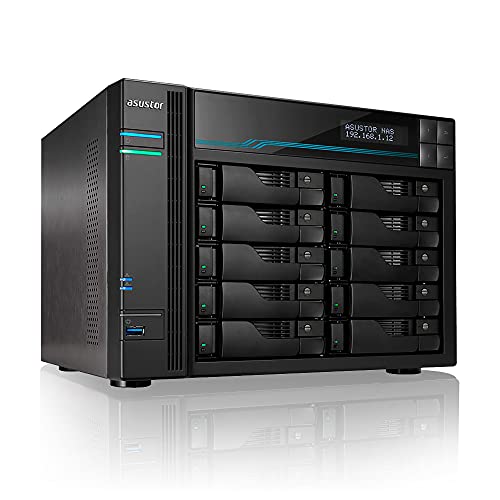
Storage growth is the central concern for a small business accumulating project files, customer records, and media across multiple drives. The Asustor Lockerstor 10 AS6510T provides ten SATA drive positions, allowing capacity to expand in stages rather than forcing an early enclosure change.
An Intel Atom C3538 quad-core processor handles file sharing, backup operations, and continuous storage tasks. The Lockerstor 10 therefore favors capacity management over the stronger processor and faster NVMe expansion found in the QNAP TVS-h674-i5.
Everyday Advantages
- Ten SATA bays provide unusually broad expansion within a single enclosure.
- The quad-core processor is oriented toward file sharing and continuous backup workloads.
- RAID support gives the enclosure tools for organizing and protecting multi-drive arrays.
Points To Note
- Populating ten bays creates a larger storage and hardware commitment than a four-bay system.
- Protection terms depend on the plan, including its covered causes, timing, and service conditions.
At A Glance
Right Fit
Growing small businesses that need many drive positions for shared files, media, and structured backup storage.
Look Elsewhere When
The Asustor Lockerstor 4 Gen2+ AS6704T v2 is a closer fit for a compact four-bay installation.
Not every backup archive needs to live inside a networked enclosure. The WD Elements 20TB Desktop External Hard Drive offers a simple attached-storage option for a large media collection, project archive, or secondary local copy kept near a primary system.
I would not treat it as a NAS, since it connects through USB rather than Ethernet and does not provide shared network access on its own. It can complement a NAS subject to that enclosure’s USB support, while the QNAP TS-464 serves as the central file hub.
The Case For It
- The 20TB capacity suits large archives that would otherwise require several smaller drives.
- USB 3.0 plug-and-play operation keeps setup straightforward for Windows PCs.
- The included Rescue plan can attempt data recovery from a covered failed drive.
Details To Watch
- Mac use requires reformatting, so confirm the drive format before moving files across platforms.
- Rescue coverage requires timely enrollment, and separate purchases require a retained receipt.
Who Will Love This
Home archivists and creators who need one high-capacity local copy without a multi-bay network enclosure.
Swap It Out When
The QNAP TS-464 is the better choice for simultaneous network access from several computers and devices.
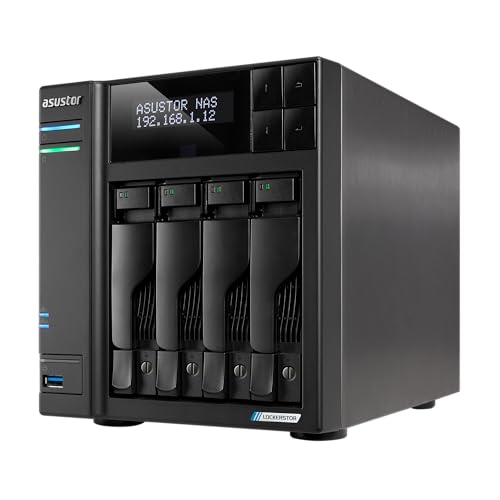
Video projects benefit from more than a shared folder, and the Asustor Lockerstor 4 Gen2+ AS6704T v2 provides a stronger creator-oriented foundation. It combines an Intel Celeron N5105 quad-core processor with 4GB of DDR4 memory, dual 5GbE connections, and four M.2 SSD positions.
The QNAP TS-464 matches the processor and four-bay layout, but the Asustor adds twice the M.2 capacity and faster 5GbE ports. Its HDMI connection and Plex Media Server support also make direct media organization a more prominent part of the package.
The Practical Payoff
- Dual 5GbE ports provide a higher network ceiling for large project files.
- Four M.2 slots create extensive room for NVMe cache or SSD pools.
- The N5105 processor supports file sharing, streaming, and continuous storage duties.
- HDMI connectivity and Plex Media Server support suit a dedicated media hub.
Trade Offs
- Its 4GB memory configuration is modest beside the 32GB supplied with the QNAP TVS-h674-i5.
Quick Facts
The Right Fit
Video editors and advanced home users who want fast networking, multiple NVMe slots, and direct media playback.
A Better Fit Elsewhere
The QNAP TVS-h674-i5 fits teams that place greater emphasis on six-core processing, 32GB of memory, and a six-bay chassis.
The first home NAS should not require a workstation-class processor, and the Asustor Drivestor 4 Pro Gen2 takes a restrained approach. Its Realtek quad-core processor runs at 1.7GHz, while 2GB of DDR4 memory and a 2.5GbE connection cover the basics of a private home cloud.
The QNAP TS-464 uses the same dual 2.5GbE approach, but it adds an N5105 processor, 8GB of memory, and two M.2 slots. I see the Asustor as the straightforward starting point, with the QNAP serving projects that need greater expansion and processing headroom.
A Few Highlights
- The 2.5GbE connection supports faster transfers than traditional Gigabit Ethernet.
- Four drive bays provide a practical starting point for household storage.
- The platform targets home file storage, backup, media streaming, and personal cloud access.
Some Limits To Know
- The 2GB memory configuration is the main constraint for heavily concurrent NAS workloads.
- As a diskless model, the four storage drives and their installation remain separate.
Best Suited To
First-time NAS users creating a private home cloud for family documents, photos, backups, and media.
Reach For A Different Pick When
The QNAP TS-464 fits a home office that needs more memory, NVMe expansion, and dual 2.5GbE connections.
What Matters Before Building a Home Cloud
Capacity And Drive Strategy
A NAS, or network attached storage, is a dedicated file server connected across a home or office network. Start with the number of users and the volume of photos, video, documents, and retained backups; bay count alone does not determine usable capacity once formatting, redundancy, and the operating system take their shares. Diskless models also require compatible drives and a careful plan for adding storage over time.
Network Speed And Compatibility
A 2.5GbE connection can shorten transfers of large project folders, but the full benefit requires compatible computers, a suitable switch, and network cabling. The Asustor Lockerstor 4 Gen2+ raises that connection speed to 5GbE, making it more relevant to creators working with large media. A conventional Gigabit connection remains adequate for many document-focused households, provided the rest of the network can keep pace.
Memory And Expansion Paths
DDR4 memory supports the NAS operating system, indexing, file sharing, and media services while they operate together. The 8GB in the QNAP TS-464, 32GB in the TVS-h674-i5, and 4GB in the Lockerstor 4 Gen2+ indicate different workload ranges. NVMe slots add another dimension: they can hold dedicated SSD storage or accelerate frequently accessed files, making processor, memory, and expansion decisions part of the same system.
Practical Lessons Before Storage Setup
Common Shopping Slip Ups
The easiest mistake is buying an enclosure without considering drive compatibility, supported RAID arrangements, or the amount of space required for the operating system. Another common error is assuming a fast NAS can deliver fast transfers through outdated network equipment. Cloud synchronization also does not automatically create a separate off-site copy, so the backup destination and retention plan need deliberate configuration.
What The Higher Tier Buys
Higher-tier models generally add faster processors, more memory, additional drive positions, and faster SSD expansion. Those attributes matter most for concurrent users, media transcoding, large project libraries, and virtualized workloads. A small household with mostly documents and photos may gain little from the additional processing power, making a simpler four-bay system the more sensible fit.
Frequently Asked Questions
Do I Need to Buy Separate Drives for a NAS?
Diskless models require compatible storage drives because the enclosure arrives without them. Check the drive interface, capacity limits, and intended RAID arrangement before ordering.
Is an External Hard Drive the Same as a NAS?
No. An external drive attaches directly to one computer through USB, while a NAS provides shared network access and centralized services such as backups, synchronization, and media libraries.
Does 2.5GbE Make Every NAS Backup Faster?
Only when the computer, switch, cables, and destination storage also support the higher connection speed. A fast enclosure connected through a Gigabit bottleneck remains limited by that slower link.
Does More NAS Memory Improve File Sharing?
More memory can help when indexing, synchronization, media, and backup services run simultaneously. Light document use may not need the additional capacity provided by a 32GB configuration.
Can a NAS Replace an Off-Site Backup?
A NAS improves centralized storage and can support cloud synchronization, but synchronization is not a substitute for a separate off-site copy. Keeping a copy away from the main NAS protects against theft, fire, hardware failure, and accidental deletion.
Final Verdict
A four-bay enclosure serves most homes, with the QNAP TS-464 offering the strongest mix of networking and expansion. The QNAP TVS-h674-i5 handles heavier creative workloads, the Lockerstor 10 targets storage growth, and the Lockerstor 4 Gen2+ emphasizes fast networks and NVMe flexibility. For a simpler first home cloud, the Asustor Drivestor 4 Pro Gen2 and the WD Elements external drive cover the basic and attached-storage ends of the category.