
A homelab often starts with scattered backups, external drives, and services that work better together. These NAS devices address that problem with local storage, network access, and varying levels of processing power, from a simple two-bay system to a desktop enclosure with multiple NVMe slots. I focus on the features that affect expansion, network planning, and everyday administration.
An Overview Of The Picks

UGREEN DXP4800 Plus 4-Bay NAS

UGREEN NAS DH2300 2-Bay for Personal Users

UGREEN NAS DXP2800 2-Bay Intel N100

Ubiquiti NAS System UNAS-2 2-Bay White
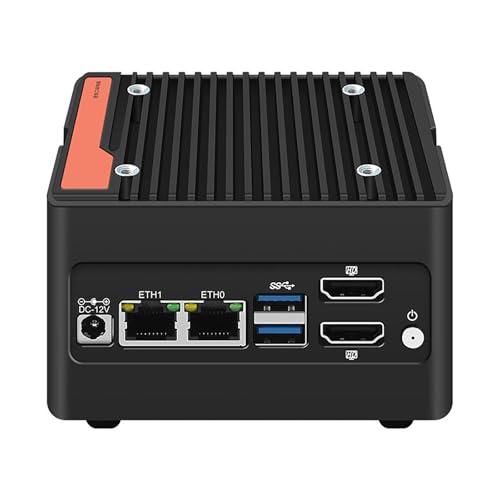
Mrroute 4-Bay NVMe Mini NAS i3-N305
Ubiquiti UNAS 2 UniFi 2-Bay NAS White
Taking A Closer Look At The Options
The DXP4800 Plus brings the most substantial processing package in this group, with a five-core Pentium Gold 8505, 8GB of DDR5 memory, and a built-in 128GB SSD. That combination gives a busy homelab more room for containers, virtual machines, and local services than a basic personal file server.
Dual network ports also make this a sensible central box for a small office. Unlike the two-bay DXP2800, it combines four drive bays, 10GbE, 2.5GbE, and two M.2 NVMe expansion positions, so I see it as the stronger fit for a growing laboratory.
Strengths Worth Knowing
- The 10GbE port supports fast transfers across a 10GbE-equipped network.
- Four bays provide more room for shared storage and RAID configurations.
- Two M.2 slots allow fast NVMe storage to complement hard drives.
- Docker and virtual-machine support suits self-hosted services.
- Windows, macOS, Linux, iOS, and Android access broadens device compatibility.
Trade Offs
- The enclosure and its four-bay expansion make it less compact than the Ubiquiti models.
- Storage drives are not included, so a complete setup requires additional hardware and installation.
Technical Highlights
Made For
Small offices, remote workers, and homelab operators running several containers or virtual machines benefit most from this configuration.
A Better Fit Elsewhere
The UGREEN NAS DH2300 2-Bay for Personal Users is easier to consider for a first NAS with a smaller two-bay footprint.
The DH2300 is framed around a straightforward transition from cloud storage and external drives to a private two-bay system. That narrower goal makes it easier to explain to a first-time owner than a Docker-focused appliance with room for virtual machines.
Phone backup is the clearest everyday use case, alongside storing photos, videos, and personal files. Compared with the DXP4800 Plus, it offers less expansion and processing headroom, but the simpler capacity profile suits a bedroom, study, or small apartment.
Reasons It Performs
- Two-bay construction keeps the initial storage arrangement understandable.
- Phone backup gives mobile files a centralized home.
- The setup position suits people moving away from scattered cloud and external-drive storage.
Small Caveats
- Two bays offer less room for adding another drive as the library grows.
- Centralized phone storage still needs a separate recovery plan for deleted or damaged files.
Right Fit For
First-time NAS owners and households wanting a simple private system for personal photos, videos, and phone backups will find this role most natural.
Consider Something Else When
The UGREEN NAS DXP2800 2-Bay Intel N100 is the better match for advanced home users who also need containers, stronger processing, and M.2 expansion.
The DXP2800 balances a low-energy Intel N100 processor with 8GB of DDR5 memory, 2.5GbE, and two M.2 NVMe slots. M.2 is a compact SSD interface, so those positions provide a way to add fast local storage without occupying the two main drive bays.
That makes the enclosure practical for a household managing family photos, 4K video, computer backups, and several small applications. Unlike the DH2300, it has visible headroom for more demanding home-server work, although the DXP4800 Plus remains the stronger choice for heavier virtualization.
The Helpful Details
- The quad-core N100 offers a practical balance of processing and efficiency.
- Two NVMe slots support fast storage for applications, caches, or active data.
- 2.5GbE suits modern home networks without demanding a 10GbE switch.
- The 4K HDMI output adds a convenient local display connection.
Practical Considerations
- Two hard-drive bays limit expansion beyond a mirror or a two-drive pool.
- NVMe storage and hard drives serve different purposes, so capacity planning benefits from care.
- A 2.5GbE network will not realize its full link rate on older 1GbE equipment.
Quick Facts
Best Suited To
Advanced home users, media libraries, and remote workers need a capable NAS without moving into a larger four-bay or desktop-class enclosure.
Not Your Match When
The Mrroute 4-Bay NVMe Mini NAS i3-N305 fits experimental builds that prioritize four NVMe positions and dual network interfaces.
Ubiquiti’s white enclosure is built around two 3.5-inch drive bays and a compact footprint, making it visually and physically suited to a tidy network shelf. RAID 1 mirroring keeps matching drives synchronized, while hot-swap support allows a failed drive to be replaced without shutting down the enclosure.
The quad-core ARM processor, 4GB of memory, and 2.5GbE connection provide a restrained platform for home networks and small offices. Compared with the DXP2800, it offers less application-oriented expansion, but its mobile management and status display suit a network integrated with Ubiquiti equipment.
A Few Strong Suits
- RAID 1 mirroring provides a clear two-drive data-protection layout.
- Hot-swap bays simplify physical drive maintenance.
- Web management and mobile status access keep routine administration approachable.
- The white polycarbonate housing fits discreetly into a living area or office.
Points To Note
- The external power supply needs an outlet close to the enclosure.
Who Will Love This
Compact-network enthusiasts and small offices that value mirrored storage, mobile monitoring, and a restrained physical design will appreciate this approach.
Look Elsewhere When
The Ubiquiti UNAS 2 UniFi 2-Bay NAS White is the stronger fit for a single-cable PoE++ network arrangement.
Four M.2 NVMe positions set this mini system apart from conventional NAS enclosures built around hard drives. The Intel i3-N305 provides eight cores and eight threads, adding more processing capacity than the DXP2800 while keeping the enclosure relatively compact.
Two Intel i226-V 2.5GbE ports, dual HDMI 2.0 outputs, and USB 3.2 Gen2 create several options for network and peripheral connections. For a homelab operator experimenting with virtual machines or local applications, that flexibility is compelling, although this is a more hands-on platform than a finished personal-storage appliance.
A Favorable Mix
- Four M.2 slots enable a storage layout based entirely on NVMe SSDs.
- The eight-thread i3-N305 supports more demanding virtualized workloads.
- Dual 2.5GbE interfaces provide additional network-path options.
- Dual 4K HDMI outputs suit local administration or media use.
- Wi-Fi 6, Wi-Fi 7, and Bluetooth 5.4 broaden wireless connectivity.
Possible Compromises
- Memory and SSD storage are not included, so assembly is part of the initial setup.
- Using both Ethernet ports requires deliberate network and software configuration.
Feature Breakdown
Built With In Mind
Experimental homelab operators, virtualization hobbyists, and builders seeking a compact four-slot NVMe system will find this the most unconventional option here.
Reach For A Different Pick When
The UGREEN NAS DH2300 2-Bay for Personal Users is a simpler fit for a newcomer who mainly wants personal file and phone backup storage.
This white UNAS-2-W model is the more explicitly network-integrated version in the Ubiquiti pair. Power and data travel through one 2.5GbE RJ45 connection using PoE++, a wired power standard that can simplify deployments in locations with nearby network switches.
The 5Gbps USB-C expansion port, 1.47-inch color display, and mobile application support improve day-to-day management. Compared with the generic Ubiquiti NAS System UNAS-2 2-Bay White, this listing makes the PoE++ arrangement, dimensional footprint, and software requirements more explicit for network planning.
Where It Excels
- PoE++ power through a single Ethernet connection reduces cable requirements.
- The included 60W adapter supports the enclosure and connected drives.
- A 5Gbps USB-C port provides a faster expansion connection than conventional USB.
- The color display presents system information without another monitor.
Details To Watch
- PoE++ support must exist on the connected network switch or injector.
- UniFi Drive version 3.1.7 or later is required for management.
Core Details
Whose Shelf It Belongs On
UniFi-focused homelab operators and compact offices that already have PoE++ network infrastructure will find the single-cable approach especially coherent.
Swap It Out When
The Mrroute 4-Bay NVMe Mini NAS i3-N305 is the better fit for virtualized workloads requiring four NVMe slots and more processor threads.
Matching A NAS To The Homelab
Start With Storage Architecture
A NAS stores data over a network, and the first decision is the number of drive bays. Two-bay systems suit a mirror or a basic storage pool, while four bays provide more room for hot spares, larger volumes, or mixed drive arrangements. NVMe slots offer speed but use a different interface from conventional hard drives, so both technologies require separate planning.
Match The Network Path
Network speed depends on the entire path, not just the NAS. A 2.5GbE connection requires a compatible switch, network interface, and storage device at the other end. The DXP4800 Plus adds a 10GbE option for larger transfers, but that speed only appears across matching 10GbE equipment.
Account For The Workload
A basic personal server needs manageable administration and straightforward backup access. Containers, virtual machines, and several concurrent applications create greater demands on processor, memory, and storage. The N100 and i3-N305 fit that progression, while the Pentium Gold 8505 in the four-bay DXP4800 Plus serves the most compute-heavy configuration here.
Check Power And Management
PoE++ combines network data and power over one cable, which can tidy up a closet or wall-mounted setup. It also creates a hardware dependency on the switch. Web interfaces and mobile applications simplify monitoring, but operating-system compatibility and required management software deserve checking before the drives are installed.
Avoiding Common NAS Purchase Traps
Mistakes Worth Dodging
A diskless configuration does not include every form of storage, so hard drives, SSDs, and memory should be checked separately. The Mrroute model specifically arrives without RAM or SSD, while several UGREEN configurations are also sold without hard drives. I also avoid treating a NAS as the only copy of important data, because RAID reduces certain failure risks but does not replace file-level recovery.
The Upgrade Payoff
A higher tier can add faster networking, more memory, NVMe expansion, or additional drive bays. Those gains matter most when a homelab runs continuous services or transfers large media files. A small personal library may gain little from a four-bay, high-core-count system, while a busy virtualized lab can outgrow a compact two-bay enclosure.
Frequently Asked Questions
Do These NAS Devices Come With Storage?
Several listed configurations are diskless, so hard drives or SSDs require a separate purchase in those cases. The Mrroute 4-Bay NVMe Mini NAS i3-N305 also excludes RAM and SSD storage.
Is a Two-Bay NAS Enough for a Homelab?
A two-bay model works well for a small lab using RAID 1 mirroring or a two-drive storage pool. Larger archives, hot spares, and mixed drive expansion favor four bays.
Does 2.5GbE Work With an Existing Home Network?
A 2.5GbE NAS can operate on a 1GbE network, though transfers will use the slower connection. A 2.5GbE switch and matching client interface are required for the full link rate.
Is RAID the Same as a Backup?
RAID keeps data available across certain drive failures, but it does not protect against deletion, corruption, or ransomware. Recovery copies remain essential for important files.
Which Model Fits a UniFi Network Best?
The Ubiquiti UNAS 2 UniFi 2-Bay NAS White is the clearest choice for a PoE++ arrangement with UniFi Drive management. It requires compatible switch power and management software version 3.1.7 or later.
Wrap Up
I would choose the DXP4800 Plus for a busy four-bay homelab, the DXP2800 for advanced home use, and the DH2300 for a simple personal introduction. The Mrroute system stands apart for NVMe experimentation, while the two Ubiquiti models appeal most to compact UniFi-centered networks. The right choice comes down to drive layout, network infrastructure, and the amount of compute the homelab actually needs.